PTIR — Daily Briefing — 2026-10-10
by
Executive Summary
Two narrow security checks deserve priority.
Google Workspace administrators should review Security Advisor and close any remaining 2-Step Verification enrollment gaps. Enforcement should be staged carefully so legitimate users are not locked out, but password-only accounts remain an avoidable risk.
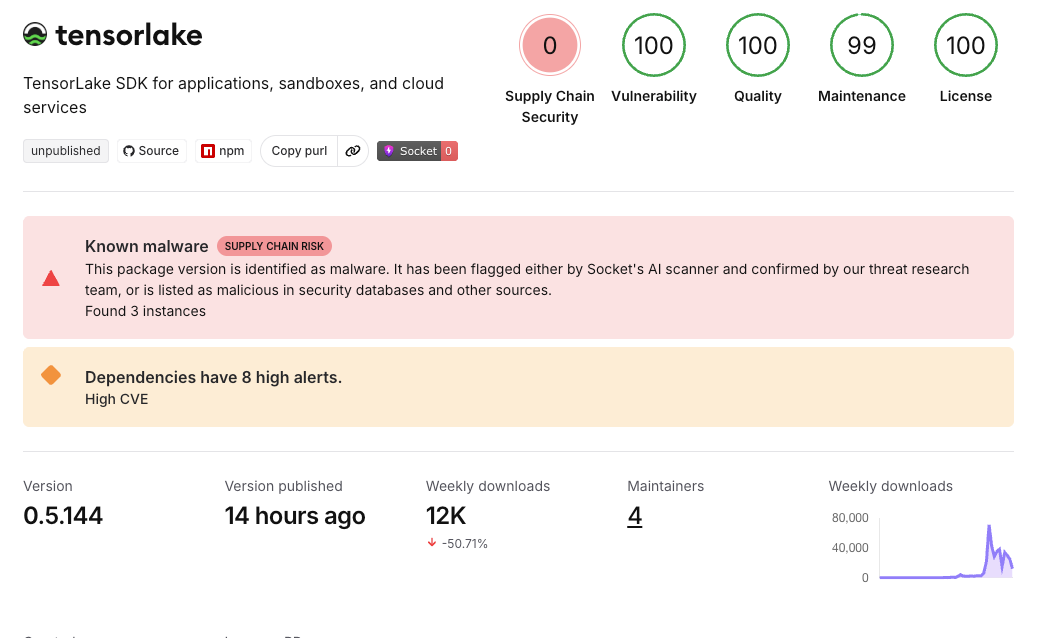
JavaScript and AI-infrastructure teams should also rule out tensorlake@0.5.144. Security researchers report that this specific npm release executed credential-stealing malware during installation, established persistence, and included a destructive response to GitHub-token revocation. If the package ran, removal of the dependency alone is not remediation.
Action Queue
1. Close Google Workspace 2-Step Verification gaps
Google’s Workspace Security Advisor can identify users who remain without 2-Step Verification protection. Google recommends enabling 2SV for administrators and key users and provides organizational-unit and group controls for staged enforcement.
Action: In the Admin console, open Security → Security Advisor and Security → Authentication → 2-step verification. Identify unenrolled accounts, confirm recovery methods and backup access, give users a short enrollment window, then enforce 2SV for the appropriate organizational unit or group. Prefer Google prompts, passkeys, or security keys over SMS when practical. Do not switch enforcement on without planning for account recovery and service accounts.
- Urgency: Immediate when unenrolled accounts exist
- Importance: ★★★★★
- Verified active: October 10, 2026
- Deadline: No external deadline; close confirmed gaps promptly
- Cost: Included in Google Workspace; hardware security keys are optional and separately purchased
- Requirements: Google Workspace administrator access; user enrollment and recovery planning
- Official guidance: Protect your business with 2-Step Verification
- Official configuration guidance: Deploy 2-Step Verification
- Security Advisor: Turn on recommended settings
2. Rule out the malicious Tensorlake npm release before rotating tokens
Socket reports that tensorlake@0.5.144, published October 8, contained a preinstall hook that launched obfuscated malware. The payload targeted npm and GitHub tokens, cloud credentials, SSH keys, Kubernetes and Vault secrets, environment files, and configuration for several AI-development tools. The affected release has been removed from npm, but prior installation may have left persistence behind.
A particularly dangerous component monitors a stolen GitHub token and can execute a destructive handler when that token is revoked. On an affected host, token rotation must therefore follow containment and removal of the monitor.
Action: Search manifests, lockfiles, build logs, package caches, CI runners, and deployed artifacts for exactly tensorlake@0.5.144. If it never ran, block that version and document the negative finding. If its install script executed, isolate the host; remove the gh-token-monitor persistence using the platform-specific instructions; only then revoke and replace exposed credentials. Audit repositories and package-publishing accounts, and rebuild compromised environments from trusted sources.
- Urgency: Immediate
- Importance: ★★★★★
- Verified active: October 10, 2026
- Deadline: Immediate for any environment that installed version 0.5.144
- Cost: Free to investigate with local package and system tools; incident-response costs vary
- Requirements: Access to dependency manifests, lockfiles, CI/build history, developer systems, and credential inventories
- Primary incident research and remediation: Socket: Tensorlake npm SDK compromise
Open Source
The Tensorlake incident is a reminder that npm provenance proves how a package was built and linked to a repository; it does not prove the source was benign. In this case, researchers say the malicious commits entered the project’s own main branch and the release still carried valid provenance.
PKb Candidates
Authentication enforcement is a rollout, not a toggle
Strong authentication requires four linked steps: identify unenrolled users, establish recovery paths, set an enrollment window, and enforce the policy. Skipping recovery planning can convert a security improvement into an availability incident.
Provenance answers origin, not intent
A valid build attestation can show that a package came from the declared repository and process. It cannot establish that the source code or maintainer account was uncompromised. Pair provenance with source review, dependency monitoring, and constrained install scripts.
tags: cybersecurity - Google Workspace - two-step verification - npm - supply chain - JavaScript - Tensorlake